
![How to Remove Vocals from YouTube Link [3 Best Ways]](https://www.worldwidewebblog.com/wp-content/uploads/2025/12/how-to-remove-vocals-from-youtube-link-1200x675.jpg)

 Khizrana Begum
Web & Informational Content Writer
Khizrana Begum is a Web & Informational Content Writer who creates clear, practical and reader-friendly content across web topics, technology, digital trends, online guides and general information.
Read Full Bio of Author →
Web & Informational
Khizrana Begum
Web & Informational Content Writer
Khizrana Begum is a Web & Informational Content Writer who creates clear, practical and reader-friendly content across web topics, technology, digital trends, online guides and general information.
Read Full Bio of Author →
Web & InformationalContent Writer
 Sameena Begum
Web & Digital Content Reviewer
Sameena Begum is a Web & Digital Content Reviewer who reviews selected WorldWideWebBlog articles for clarity, structure, consistency, readability and responsible presentation.
Read Full Bio of Reviewer →
Web & Digital
Sameena Begum
Web & Digital Content Reviewer
Sameena Begum is a Web & Digital Content Reviewer who reviews selected WorldWideWebBlog articles for clarity, structure, consistency, readability and responsible presentation.
Read Full Bio of Reviewer →
Web & DigitalContent Reviewer
Table of Contents
Introduction
Thanks to AI tools that are powered by modern technology, it is now very simple to remove vocals from a YouTube link. With a sophisticated tool such as an AI Acapella Extractor, you can separate vocals and instrumentals in a matter of seconds using only a video URL. This helps creators, singers, and editors in getting pure background music, karaoke tracks, or vocal isolations without the need for technical knowledge.
This article is primarily aimed at presenting to you the top three most effective methods of getting rid of vocal tracks from YouTube videos. You will be uncovering the instructions in detail, prominent features, and practical use of each tool so that you can decide which tool is the most compatible with your working method. Regardless of whether you are focusing on precision, ease, or quickness, this guide will provide you with all the means to carry out your audio extraction task without any effort.
Fix 1: Remove Vocals from YouTube Link via EaseUS Online Vocal Remover
EaseUS Online Vocal Remover is perhaps the most dependable AI-powered tool that can separate the vocal and music parts of any YouTube link. To achieve this, it employs an advanced AI Acapella Extractor engine which not only detects the human voice but also isolates the instrumentals and finally produces the clean audio in a matter of seconds–all without the need for a software installation. As it is entirely web-based and supports both audio and video files, it is the right choice for those users who value quick, accurate, and effortless vocal removal.
This tool is distinguished by the fact that it is a cloud-based one, extremely fast, and has the capability of dealing with large files. In other words, all you have to do is insert the URL of the YouTube clip, let the AI work on your track, and then get the downloaded file of the separated vocals or instrumentals directly. Thus, if you are looking for karaoke tracks, background music, or stems for remixing, EaseUS is the tool that will make the whole process smooth and trouble-free.
Key features of EaseUS Online Vocal Remover
- AI-powered separation: 80% improved accuracy with the latest audio models.
- URL support: Extract audio directly from YouTube and SoundCloud links.
- Universal format compatibility: Works with MP4, MOV, MP3, WAV, FLAC, M4A, and more.
- Cloud-based processing: No heavy hardware required—everything runs online.
- Fast performance: 2× faster extraction speed with enhanced AI.
- Platform support: Runs on Web, Android, and iOS.
- Supports large files: Up to 60 minutes and 1GB in size (with Pro).
Step by step guide to remove vocals from a YouTube link
Step 1. Visit the official EaseUS Vocal Remover website.
Step 2. Select “Choose File” or dropping a file will work as well if you have a local copy of YouTube audio or video (it might be necessary to convert YouTube to MP3/MP4 first). The program can handle files up to 1GB in length of 60 minutes.
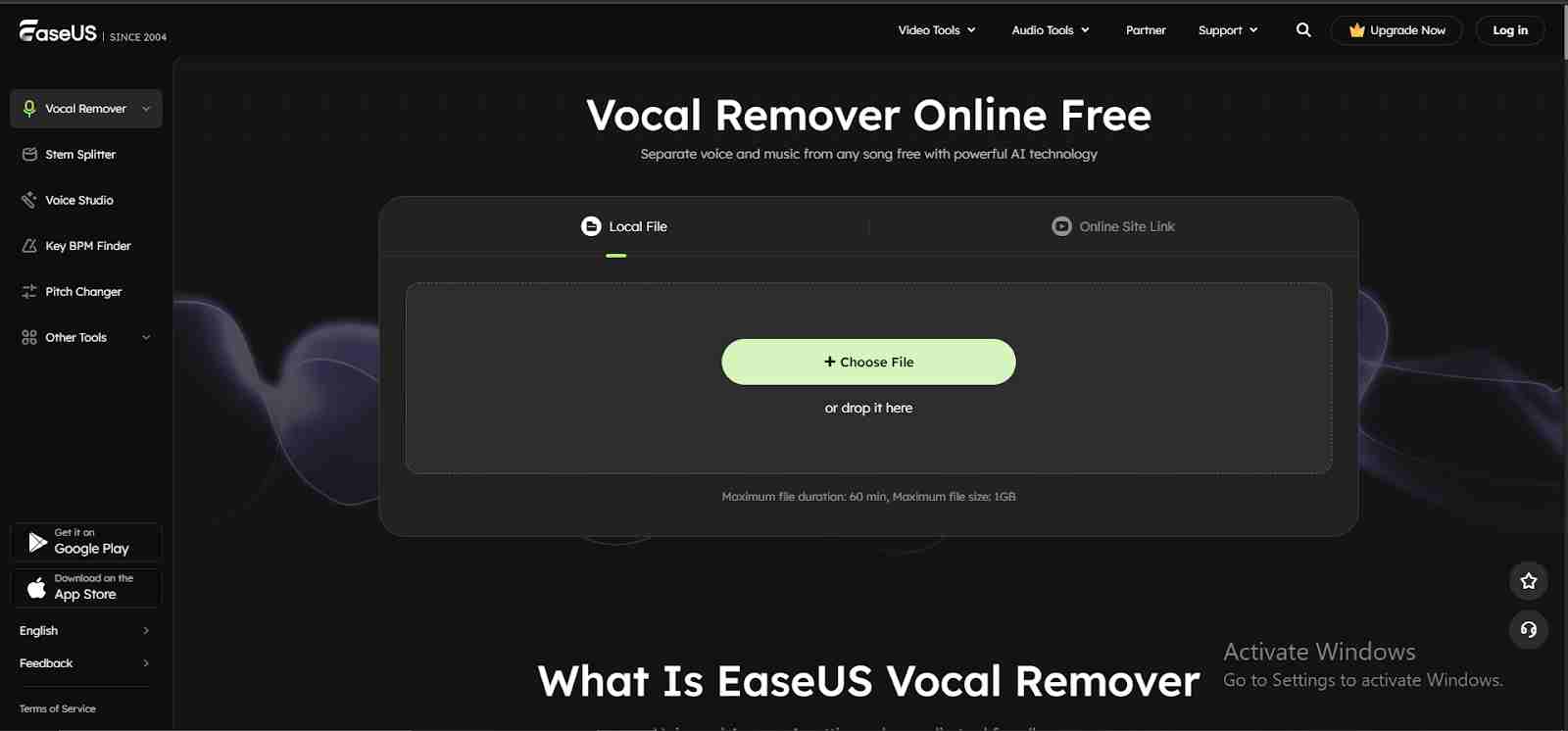
Step 3. The AI will identify the voice to be removed and remove it from the music in a matter of seconds after the upload.
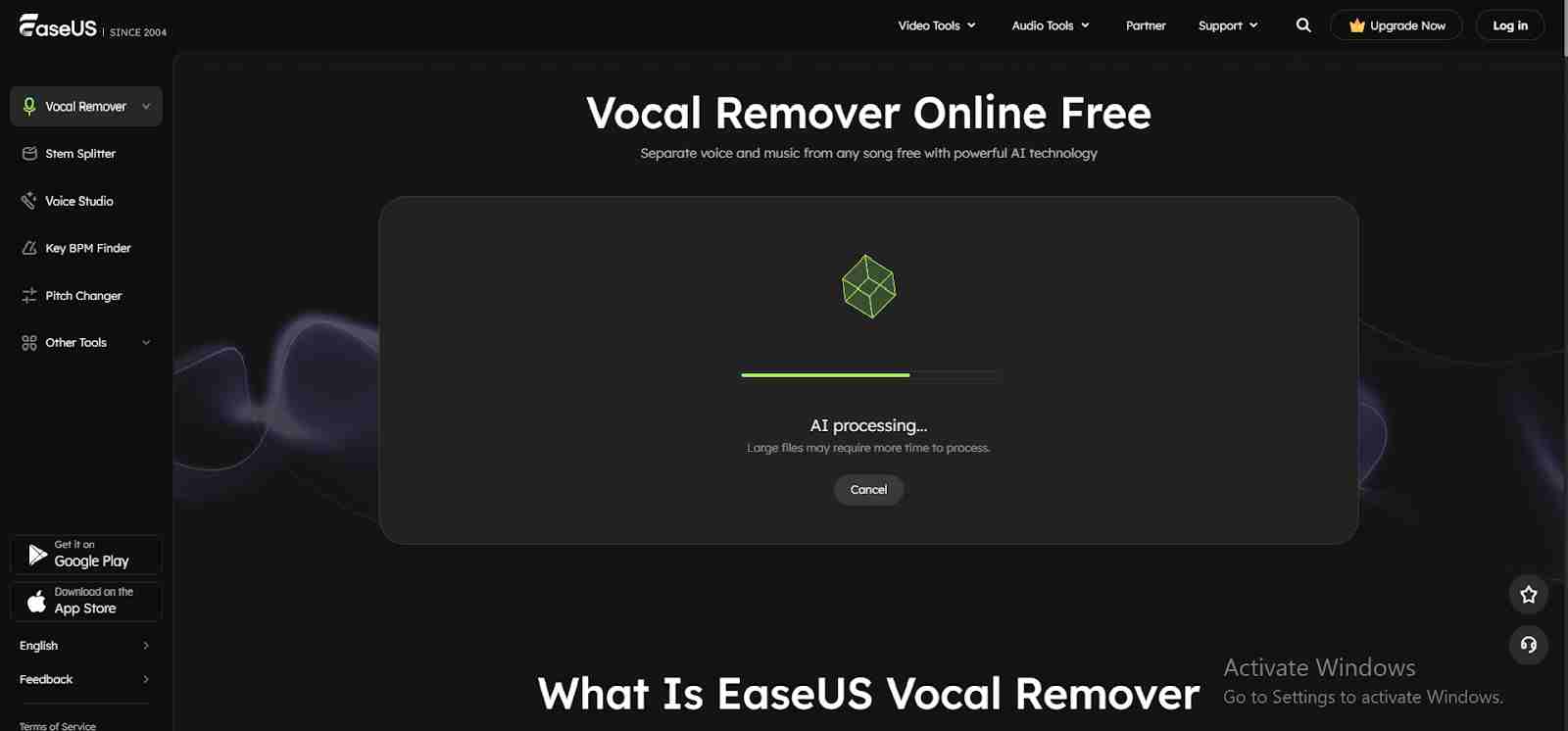
Step 4. Check the instrumental or karaoke track after the AI has finished working with it. Save it to your device.
Fix 2: Separate Vocals from YouTube Link via MazMazika
MazMazika is another robust online solution that simplifies vocal separation, making it quicker and accurate to a high degree. It is equipped with such features that serve creators who require their work done fast; that is, it allows you to carry out vocal removal straight from a YouTube or SoundCloud link without the need for a video download. By means of its advanced AI engine, MazMazika can separate up to five stems — vocals, drums, bass, piano, and other instruments—thus, the possibilities are endless for karaoke creation, remixing, and music production. The interface is clean and user-friendly; in fact, even a novice can accomplish audio separation with just a few clicks.
Working with MazMazika is simple: insert your YouTube link, set the number of stems you want (2–5), pick a processing mode, and the rest will be done by the AI. It ensures accurate vocal isolation and allows quick processing so that you can easily download the clean karaoke tracks or acapella vocals. Regardless of whether you are a singer, DJ, or content creator, the results you get from this tool will be of professional quality, and you don’t need to pay for them.
Key features of MazMazika
- Removes vocals directly from YouTube/SoundCloud links.
- Up to 5-stem separation (vocals, drums, bass, piano, others).
- Fast and high-precision AI vocal isolation.
- Free online tool—no installation required.
- Supports MP3, WAV, and more audio formats.
- Mixer mode is available for more control over stems.
- Also includes a real-time Chord Analyzer for musicians.
Step by step guide to remove vocals from a YouTube link
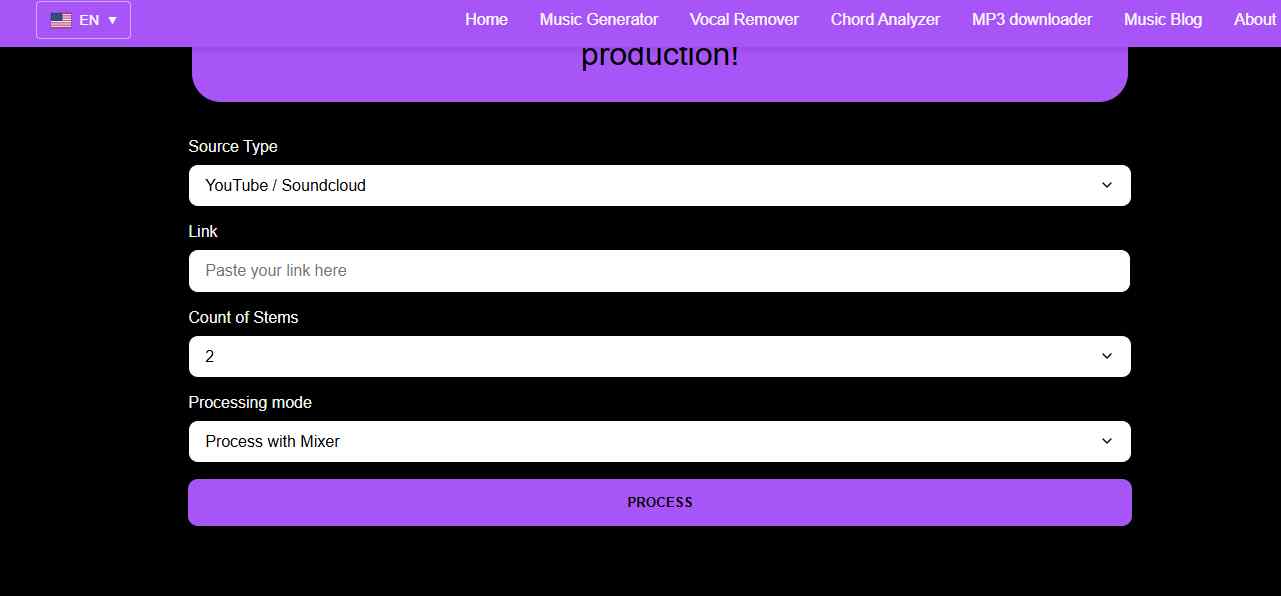
Step 1. Visit the official MazMazika Vocal Remover website and paste the YouTube video link.
Step 2. Split the audio into 2, 4, or 5 stems. More stems mean a more thorough separation of voices, percussion, bass, keyboard, and other elements.
Step 3. Click “Process” and let MazMazika finish. AI swiftly analyzes and splits sounds.
Fix 3: Extract Vocals from YouTube Link via Kapwing
Kapwing is among the simplest methods to remove vocals from a YouTube link directly without any software downloads or the use of complicated audio tools. Just by inserting the YouTube URL into Kapwing, its AI-powered Vocal Remover will do the separation of vocals from the instrumental track automatically. Thus, it becomes extremely handy for making karaoke versions, remixes, podcast beds, intros/outros, or background music for faceless videos. Since it supports MP3, MP4, and direct URL import, Kapwing is turning audio editing into a quick, smooth, browser-based session.
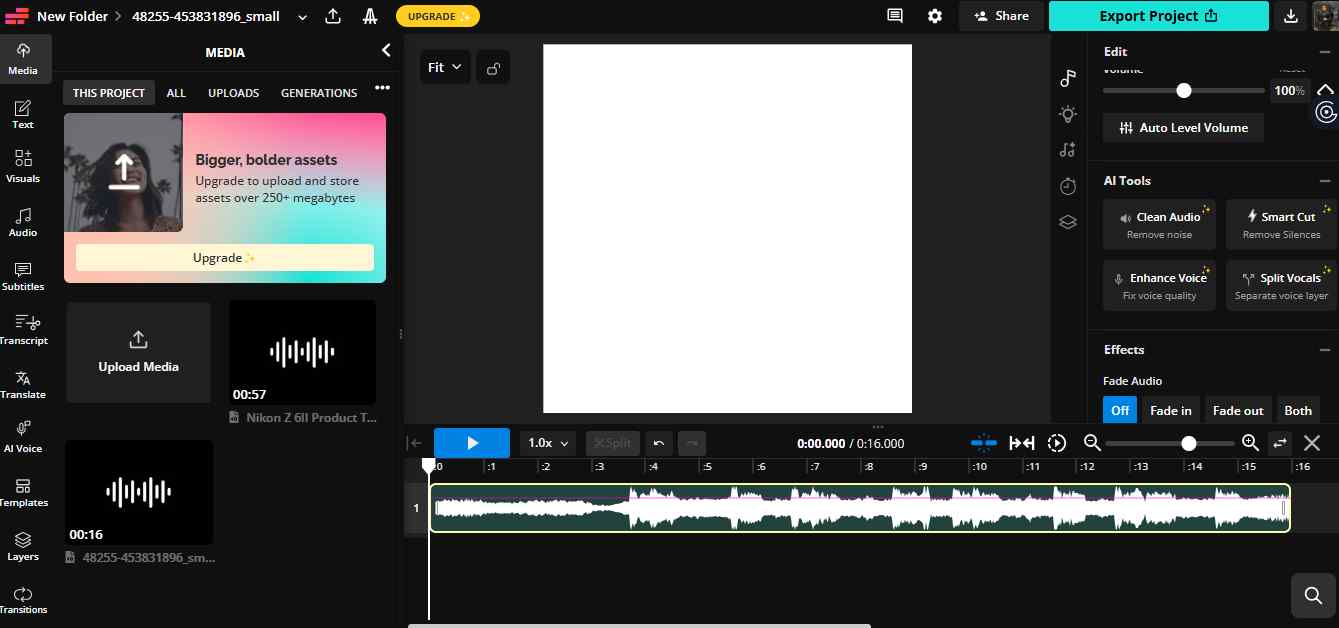
After loading YouTube audio, you can employ the Split Vocals tool to get a one-click isolation of vocals and instrumentals. Kapwing provides you with two clean tracks – just what you need if your intention is to silence the vocals, obtain acapella, or create a custom remix.
Step by step guide to remove vocals from YouTube link
Step 1. Visit the official website and click Choose Files. Then paste your YouTube link into the input box to import the audio.
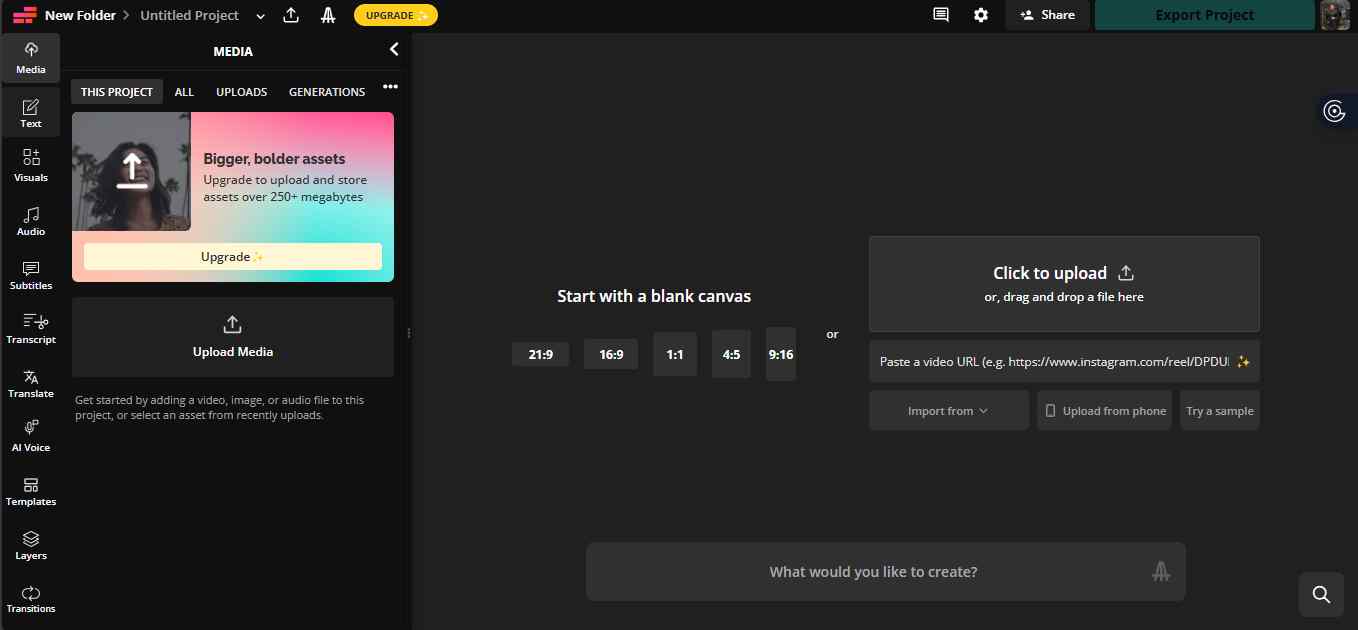
Step 2. Use the Split Vocals option from the right toolbar to separate the vocal track.
Step 3. Once the processing is complete, download the YouTube video with the vocals removed to your device.
Conclusion
With the help of AI-powered tools that are available online, removing vocals from YouTube videos has become very simple. We have covered three methods in the article: EaseUS Online Vocal Remover, which provides a quick, cloud-based, and very accurate separation; MazMazika, which is referred to for its multi-stem separation and karaoke-ready outputs; and Kapwing, a versatile online editor that allows direct URL input and easy vocal isolation. Each instrument offers different features to meet various requirements, from a professional remix to a casual karaoke creation.
Among the alternatives presented, EaseUS Online Vocal Remover can be considered the most appropriate solution for most users. Its mix of speed, precision, platform flexibility, and provision for direct YouTube link extraction makes it perfect for both novices and advanced creators. Regardless of whether you are after clean instrumentals, acapella tracks, or background music, EaseUS is the one that guarantees a flawless, top-notch experience every time.
FAQs about removing vocals from YouTube link
How do I remove vocals from a YouTube link?
Select a reliable YouTube downloader and download the video in MP3 or MP4 format for vocal removal. Then, upload the file to EaseUS Vocal Remover. This AI-driven tool separates the voices from the music automatically. After the operation, you may save the instrumental version.
Can I remove vocals directly from a YouTube link without downloading the video first?
Yes. With the help of EaseUS Online Vocal Remover, you can simply insert a YouTube URL and get the vocal and instrumental tracks separated right away without having to download the video.
What are the supported audio/video formats for vocal removal?
Generally, many different formats can be handled by contemporary vocal removal tools, which are usually included: MP3, WAV, M4A, MP4, MOV, FLAC, and the like. In this way, the user has the allowance of either a downloaded video or an audio file to start with.
Khizrana Begum is a Web & Informational Content Writer who creates clear, practical and reader-friendly content across web topics, technology, digital trends, online guides and general information.
Sameena Begum is a Web & Digital Content Reviewer who reviews selected WorldWideWebBlog articles for clarity, structure, consistency, readability and responsible presentation.