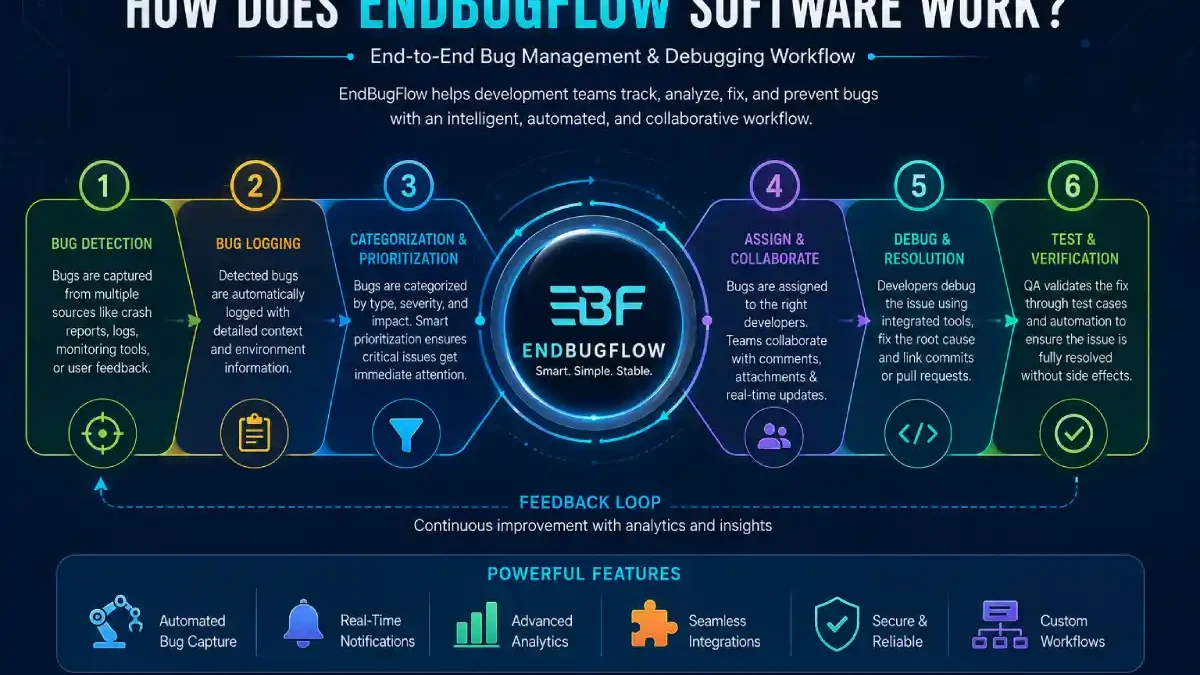
Software development rarely unfolds as smoothly as intended. A function that appears fine on one computer may not execute on a different one. A fresh version update might manifest a completely unexpected problem. A frequently cited scenario of exceptionally frustrating bugs, these issues only occur when a piece of software is actually used by real customers. This is where bug management and debugging workflows become important.
EndBug Flow is presented online as a platform focused on debugging, optimizing software workflows, and end-to-end bug resolution. Its official website describes its focus around debugging foundations, workflow optimisation, core technology concepts, and end-to-end debugging frameworks.
However, what does that actually mean? How does EndBugFlow work, and how is it part of the everyday routine for a development team?
The simplest comparison is EndBugFlow provides a process by which an organization goes from “something isn’t working right” to “we have discovered why it is the way it is, fixed it, and tested that we have done the fix.”Due to limitations with available product documentation, descriptions about specific integrations, automation features, or artificial intelligence functionality online are best taken as documented functionality and not necessarily verified specs.
Table of Contents
What Is EndBugFlow Software?
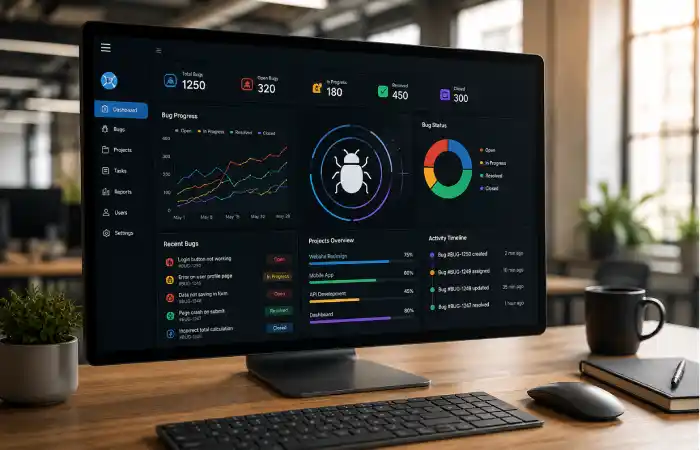
Definition: EndBugFlow software can be understood as a debugging and workflow-oriented platform designed to help organize software problems from discovery through investigation, resolution, and verification.
The name itself gives a useful clue:
- End suggests an end-to-end process.
- Bug refers to software defects, errors, or unexpected behavior.
- Flow refers to the movement of an issue through a defined workflow.
The official Endbugflow site emphasizes practical bug-resolution methods, root-cause analysis, development workflow optimization, and structured problem-solving.
In a normal development workflow there could be several locations you find information about a single bug. A programmer might find the issue on a logfile, a test might generate a ticket, other developers talk about it on a chat program and the fix may reside in a different code branch.
The purpose of a connected workflow is to bring these pieces together.
Instead of treating debugging as a collection of unrelated activities, the process becomes a sequence:
Detect → Record → Understand → Prioritize → Fix → Test → Verify → Close
That simple sequence is the foundation behind modern bug-management practices.
Why Is a Bug Workflow Important?
A bug itself is only part of the problem.
The bigger problem is often what happens after someone discovers it.
Imagine a tester reports that a login button occasionally stops working. If the report simply says “Login is broken,” a developer has very little useful information.
What browser was being used?
Which operating system?
What steps caused the problem?
Was the problem consistent?
Did it happen after a recent update?
Was the issue already reported?
A structured workflow answers these questions.
Bug workflow is a structured flow of activities a team will use to capture, explore, assign, fix, test, and document a software issue bug tracing it is not enough to be able to identify the broken lines of code; enough context must also be preserved so that those bugs remain an interesting anecdote and not the source of repeated bewilderment.
How Does EndBugFlow Software Work?
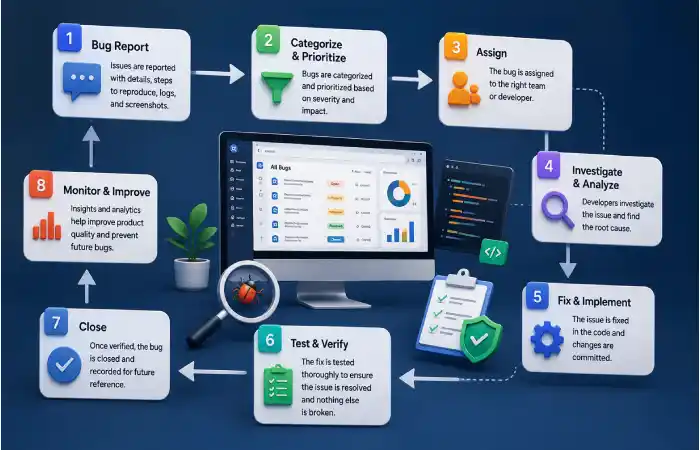
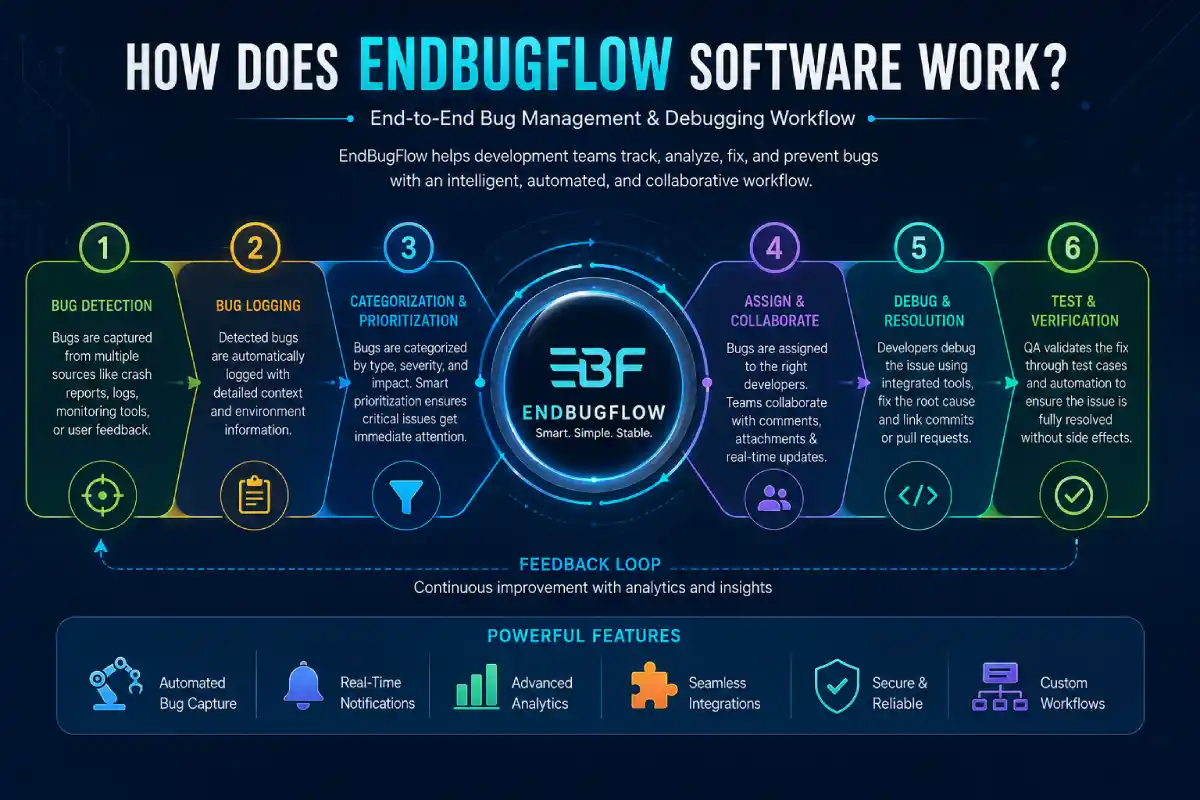
The reported EndBugFlow approach can be understood through several connected stages. The exact implementation may differ depending on the available version, configuration, or integrations, but the underlying idea is straightforward.
1. A Software Problem Is Identified
Everything starts with an observation.
A problem may be discovered by:
- A developer during coding
- A QA tester during testing
- A customer after release
- An automated test
- Application monitoring
- Error logs
- A deployment or CI/CD process
For example, suppose an online store suddenly produces an error when customers attempt to complete payment.
That event needs to become more than a vague complaint.
A useful bug record should describe what happened, when it happened, where it happened, and, whenever possible, how another person can reproduce it.
This first stage creates the foundation for everything that follows.
2. The Issue Is Recorded With Context
Once a problem has been identified, it needs to be documented.
A good bug record may include the issue description, reproduction steps, environment information, screenshots, logs, timestamps, and other relevant technical details.
Some online descriptions of EndBugFlow report automated issue capture and enrichment through development systems, although the official public site does not provide enough technical documentation to independently verify every claimed integration.
The important concept is context preservation.
A developer should not have to spend 30 minutes asking a tester what happened before even beginning the investigation.
The more useful information attached to an issue, the shorter the path toward diagnosis can become.
3. Bugs Are Classified and Prioritized
Not every bug deserves the same level of attention.
A spelling mistake on a rarely visited page is very different from an error that prevents customers from completing payments.
Bug prioritization is the process of deciding which issues should be addressed first.
Teams commonly consider factors such as:
- Severity
- Number of affected users
- Business impact
- Security implications
- Frequency of occurrence
- Release deadlines
- Availability of workarounds
Some descriptions of EndBugFlow portray automated classification and prioritization as part of its workflow. However, because public product documentation is limited, those capabilities should be confirmed before being treated as guaranteed product features.
The basic principle remains valuable regardless of the tool: the most damaging problems should rise to the top of the queue.
4. The Issue Moves to the Right Person
After an issue has been understood and prioritized, someone needs to own it.
This is where assignment becomes important.
A bug involving database performance may belong to a backend engineer. A layout problem may be better handled by a frontend developer. A failed test may require attention from a QA engineer before a release can continue.
Issue assignment means giving responsibility for the next action to a specific person or team.
Without clear ownership, bugs can become everyone’s problem and therefore nobody’s immediate responsibility.
A well-designed workflow makes ownership visible.
Instead of asking, “Who is looking into this?”, a team should be able to look at the issue and immediately understand who owns it and what stage it has reached.
5. Developers Investigate the Root Cause
This is the heart of debugging.
Finding the visible symptom is not always enough.
For example, a website may display a blank page. The blank page is the symptom, not necessarily the cause.
The underlying problem might be:
- A failed API request
- Invalid data
- A database timeout
- A JavaScript exception
- A deployment configuration error
- An authentication failure
Root-cause analysis means looking beyond the visible symptom to determine why the problem occurred.
Endbugflow’s official material specifically highlights root-cause analysis and structured debugging as part of its focus.
This is an important distinction. Good debugging does not simply ask, “How can we hide this error?”
It asks:
“Why did this happen, and what needs to change so it does not happen again?”
6. The Fix Is Developed and Reviewed
Once the likely cause has been identified, the developer can work on a solution.
In a modern development environment, this might involve:
- Creating or modifying code
- Running local tests
- Creating a branch
- Committing changes
- Opening a pull request
- Reviewing the code
- Running automated tests
- Moving the change toward deployment
The issue remains part of the workflow instead of disappearing the moment someone edits the code.
That connection is useful because it gives the team a history of what was changed and why.
7. The Fix Is Tested
A bug should not be considered fixed simply because a developer can no longer reproduce it.
Testing is the next important step.
Bug verification means checking that the reported problem has actually been resolved and that the solution has not created another problem elsewhere.
QA teams may repeat the original reproduction steps. They may also perform regression testing to make sure related features still work.
For example, if a payment error was fixed, testers should verify the successful payment path, failed payment path, refund process, and related order creation behavior where appropriate.
This is why the bug lifecycle is better represented as a loop rather than a straight line.
Problem → Fix → Test → Problem again if necessary → Retest → Close
8. The Issue Is Closed or Reopened
If testing confirms that the problem has been resolved, the issue can be closed.
If the bug still exists, it should be reopened.
That distinction is important.
Closing an issue simply because someone changed the code creates misleading project statistics. A properly closed issue should represent a verified outcome.
Over time, this history can also help teams identify patterns.
If the same category of bug repeatedly appears after a particular type of deployment, the team may have a process problem rather than a single isolated coding mistake.
EndBugFlow vs Traditional Bug Tracking
The biggest difference between a modern workflow-oriented approach and traditional tracking is not necessarily the existence of a bug list. Almost any task-management tool can create a list.
The difference is how connected the process becomes.
| Area | Workflow-Oriented EndBugFlow Approach | Traditional Tracking |
| Bug reporting | Structured issue information | Often manual |
| Issue ownership | Defined workflow | May depend on individuals |
| Debugging | Focus on structured investigation | Often handled separately |
| Progress | Workflow stages | Basic ticket status |
| Collaboration | Connected issue context | Can be scattered |
| Testing | Part of the lifecycle | Sometimes separate |
| Resolution | Track through closure | May simply mark a ticket complete |
This table should be viewed as a conceptual comparison rather than a complete verified product specification, because publicly available EndBugFlow documentation does not establish every feature listed by third-party sources.
What Makes a Good Bug-Flow System Useful?
A useful bug workflow does more than collect errors.
Centralized Information
The first benefit is organization.
When issue details, technical notes, progress updates, and verification results stay connected, developers spend less time searching for background information.
Clear Ownership
Every unresolved issue should have a next step.
Clear ownership prevents bugs from sitting untouched simply because everyone assumes someone else is handling them.
Better Visibility
Project managers and technical leads need to know whether a release is healthy.
A workflow makes it easier to see how many issues are open, which ones are critical, and where work is getting delayed.
Faster Communication
Debugging often involves several people.
A tester may discover the problem. A developer investigates it. A product manager explains the business impact. Another tester verifies the fix.
A connected workflow gives these people a shared reference point.
Learning From Previous Bugs
One of the most valuable benefits of structured bug management is historical knowledge.
A resolved bug can become a useful record of what happened, why it happened, and how it was corrected.
That history can help developers recognize similar problems in the future.
EndBugFlow for Developers
For developers, the main value of an organized debugging workflow is reduced uncertainty.
Instead of receiving a vague message such as “The page isn’t working,” a structured issue can provide the relevant context needed to start investigating.
The developer can then focus on the technical question:
Where is the failure occurring, and what is causing it?
This is especially helpful in larger projects where developers may be responsible for several services or features simultaneously.
EndBugFlow for QA Teams
QA teams benefit from consistency.
A tester can document the exact behavior observed and then use the same issue record to track whether the fix has been delivered.
This creates a clean relationship between:
Bug discovered → Developer action → New build → Retest → Result
It also makes recurring problems easier to recognize.
EndBugFlow for Project Managers
Project managers often do not need to read every line of a stack trace.
What they need is visibility.
Which bugs are blocking the release?
Which ones are overdue?
Who owns them?
Which fixes are waiting for testing?
Are critical issues increasing or decreasing?
A structured workflow can turn these questions into measurable project information.
Benefits of Using an End-to-End Bug Workflow
The strongest advantage is not simply automation. It is continuity.
When a problem moves through a defined process, fewer details are lost between teams.
The major benefits include:
- Better organization of software defects
- Clearer ownership
- More consistent debugging
- Faster access to technical context
- Improved collaboration
- Easier QA verification
- Better visibility into development progress
- More useful historical records
- Reduced dependence on scattered messages and spreadsheets
However, software cannot replace good engineering judgment.
A workflow tool can organize information, but developers still need to understand the system, interpret evidence, test hypotheses, and choose an appropriate fix.
Is EndBugFlow the Same as a Simple Bug Tracker?
Not necessarily.
A simple bug tracker primarily answers:
“What bugs do we have?”
An end-to-end workflow attempts to answer a broader set of questions:
“What happened?”
“How serious is it?”
“Who owns it?”
“Why did it happen?”
“Is the issue actually resolved?”
That broader perspective is what makes workflow-based debugging useful for development teams.
Things to Check Before Using EndBugFlow
Anyone considering EndBugFlow should avoid choosing a development tool based solely on online descriptions.
Because publicly available technical documentation appears limited, verify the current product capabilities directly before adopting it.
Important questions include:
- What integrations are officially supported?
- Does it connect with your existing development tools?
- Can workflows be customized?
- How are permissions handled?
- What information is captured with each issue?
- Are automated notifications available?
- What reporting features are provided?
- How is project data protected?
- What are the current pricing and licensing terms?
- Is technical support available?
These questions are more useful than simply asking whether a platform has a long feature list.
The best software is the one that fits the team’s existing workflow without creating another layer of unnecessary complexity.
Final Thoughts
How can the software EndBugFlow then actually be used? At its core, the product should intuitively appear to people: a problem is noticed at the point it enters the workflow, documented and understood, identified and the relevant issues researched, the problem is assigned, studied and fixed, then tested and ideally marked up as resolved and closed, or alternatively returned to the start of the pipeline for more work.