
 Khizrana Begum
Web & Informational Content Writer
Khizrana Begum is a Web & Informational Content Writer who creates clear, practical and reader-friendly content across web topics, technology, digital trends, online guides and general information.
Read Full Bio of Author →
Web & Informational
Khizrana Begum
Web & Informational Content Writer
Khizrana Begum is a Web & Informational Content Writer who creates clear, practical and reader-friendly content across web topics, technology, digital trends, online guides and general information.
Read Full Bio of Author →
Web & InformationalContent Writer
 Sameena Begum
Web & Digital Content Reviewer
Sameena Begum is a Web & Digital Content Reviewer who reviews selected WorldWideWebBlog articles for clarity, structure, consistency, readability and responsible presentation.
Read Full Bio of Reviewer →
Web & Digital
Sameena Begum
Web & Digital Content Reviewer
Sameena Begum is a Web & Digital Content Reviewer who reviews selected WorldWideWebBlog articles for clarity, structure, consistency, readability and responsible presentation.
Read Full Bio of Reviewer →
Web & DigitalContent Reviewer
Avid Media Composer refers to a professional non-linear editing (NLE) software that is designed to operate in post-production at scale volume (ideally long) and collaboratively (i.e. feature film, episodic TV, broadcast, and enormous commercial work). It was developed with the consideration of a ground-up design of editors with large media libraries, complex media format, and multi-user workflows where reliability, precision, and media control are the most important.
Two short, practical bullet points:
- Potential: great media management and collaborative work among multi-users in regard to massive projects.
- Trade-off: learner SH CSH, more workflow rigidity is characterized than consumer-friendly NLEs.
(Recent Avid releases keep updating to keep up with modernisation of workflow, as well as introducing AI-supported features such as smarter transcripts and proxy/high-res linking; the product pages of Avid are listing these continuing enhancements.)
Overview of Avid Media Composer
| Feature | Details |
| Software Name | Avid Media Composer |
| Developer | Avid Technology |
| Release Year | 1989 |
| Software Type | Non-linear video editing (NLE) |
| Platforms | Windows and macOS |
| Main Users | Film editors, TV studios, broadcasters, and media professionals |
| Industry Usage | Film production, television editing, news broadcasting, and video post-production |
Table of Contents
Who uses Media Composer (and why)?
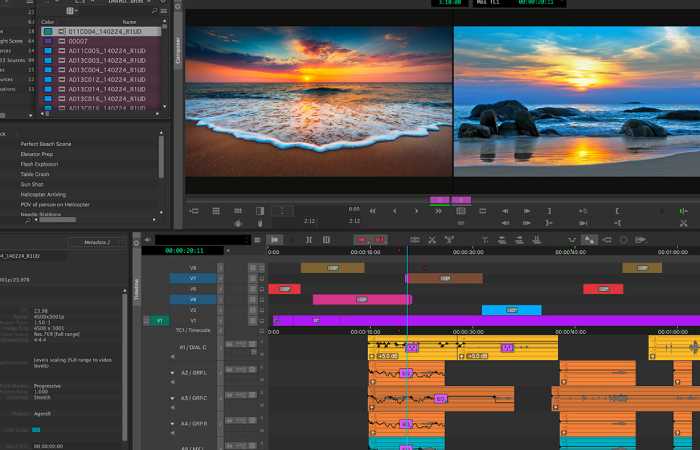
- Feature-film and TV editors who need robust media tracking, frame-accurate trimming, and project locking tools.
- Broadcast houses and newsrooms that value stability and integration with editorial and audio finishing systems.
- Post-production teams requiring shared storage, permissions, and collaboration features.
- Editors moving between broadcast and finishing — Media Composer’s ecosystem ties well into grading and audio stages used in professional film pipelines.
A quick human note: Media Composer is less about “fast YouTube edits” and more about repeatable, defensible, team-friendly workflows. If your daily work involves dozens to hundreds of hours of footage, multiple assistants, and deliverables for many formats — Media Composer stays calm under that pressure.
Key Features of Avid Media Composer
Avid Media Composer includes many advanced tools that help professional editors create high-quality films, television programs, and digital media content.
Professional Non-Linear Editing
Avid Media Composer uses a non-linear editing system, allowing editors to arrange and modify video clips in any order without changing the original files. This makes the editing process flexible and efficient for complex projects.
Advanced Media Management
The software provides powerful tools to organize, search, and manage large media files. Editors working on big productions can easily track thousands of video and audio clips within a single project.
Multi-Camera Editing
Editors can synchronize and edit footage from multiple cameras at the same time. This feature is especially useful for live events, interviews, and television shows.
High-Resolution Video Support
The software supports high-quality video formats such as HD, 4K, and even higher resolutions, making it suitable for modern film and broadcast production.
Collaborative Editing Workflow
Avid Media Composer allows multiple editors to work on the same project simultaneously through shared storage systems, which improves teamwork and speeds up production workflows.
Integrated Visual Effects and Color Correction
Editors can apply visual effects, transitions, and color grading directly inside the software to enhance the visual quality of videos.
AI-Powered Editing Tools
Recent versions include artificial intelligence features such as speech-to-text transcription, dialogue search, and automated metadata tagging to speed up editing tasks.
Audio Editing Integration
The software integrates smoothly with professional audio tools like Avid Pro Tools, allowing editors to refine sound and music during post-production.
Reliable Performance for Large Projects
The platform is designed to handle long films and complex television productions with stable performance and efficient processing.
Customizable Interface
Editors can customize the workspace layout, keyboard shortcuts, and editing tools to match their workflow preferences.
What’s new/important in recent releases
Incremental releases with specific features Avid has been issuing incremental updates of its software, as above, with improved transcript workflows, speech-to-text, improved proxy/high-res linking to enable fast conform and playback, and collaboration tools to reduce friction between editorial and audio department. The purpose of these updates is to introduce part of the convenience that modern editors desire and maintain the enterprise-level backbone.
| Version / Release | Key New Features | Why It’s Important |
| Media Composer 2024.2 | Shared transcription database for PhraseFind AI; ability to export transcripts and SubCap files from sequences | Saves time by reusing transcriptions across multiple projects and simplifies subtitle workflows. |
| Media Composer 2024.6 | AI-powered transcript tool with speech-to-text search; improved integration with Pro Tools; expanded cloud collaboration with Avid Huddle | Editors can quickly find spoken dialogue, collaborate remotely, and exchange audio sessions with fewer compatibility issues. |
| Media Composer 2024.12 | Native support for Apple Silicon (M-series Macs); source-side audio waveforms in Source Monitor; improved background transcription controls | Better performance on modern Macs and improved editing decisions using visual audio information. |
| Media Composer 2025.6 | Proxy workflow available for Ultimate licenses; improved transcript settings and UI; better indexing control for PhraseFind AI | Makes remote editing and large-project workflows easier and faster. |
| Media Composer 2025 (general improvements) | AI automation tools (auto-tagging, facial recognition, subtitle generation); improved GPU performance and support for high-resolution formats like 8K and HDR | Speeds up editing workflows and handles modern high-resolution video production more efficiently. |
The Core Strengths — Practical Breakdown
- Media and project management (killer feature)
Media Composer’s bin structure, AMA/OP-Atom linking, and experience with shared storage (Avid NEXIS, third-party SANs) is built for multi-editor environments. When media must be tracked, relinked, and handed off, Media Composer is purpose-built for that lifecycle.
- Precision editing tools
Trim modes, slip/slide, sync locks, and high-precision keyboard shortcuts are tuned for editors who spend all day trimming. If you prize speed and precision, its toolset is designed for repeatability.
- Collaboration & enterprise features
Versioning, project sharing, role-based permissions, and integrations with finishing suites make it a reliable choice for studios and broadcasters.
- Stability with large projects
Because it was designed for broadcast and theatrical pipelines, it scales predictably as bins grow and timelines get complex.
Quick glossary — plain definitions you’ll actually use
- Bin: A project-level container for clips, sequences, and assets (think folders with editorial metadata).
- Consolidate/Transcode: Making sure media files are organized and encoded for reliable playback and transfer.
- Avid NEXIS: A shared storage solution often paired with Media Composer for team editing.
- Proxy/high-res linking: Working with lightweight proxy files for editing while retaining links to high-res masters for finishing.
Benefits of Avid Media Composer
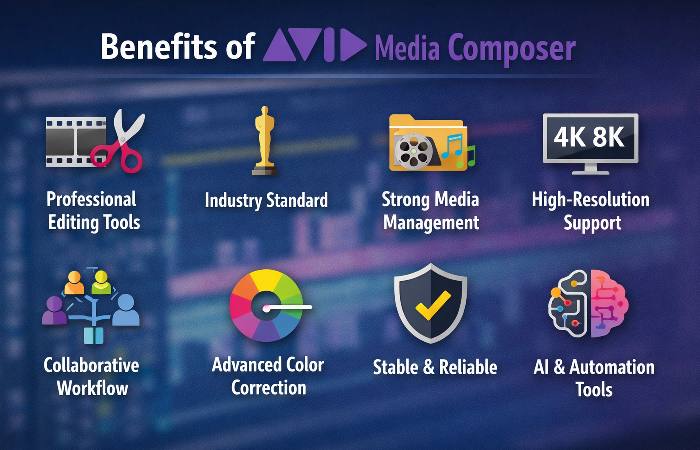
Avid Media Composer is widely used in professional video production because it provides powerful editing tools, advanced media management, and reliable performance for large projects.
| Benefit | Description |
| Professional Editing Tools | Provides advanced editing features such as trimming, multi-camera editing, and precise timeline control for high-quality video production. |
| Industry Standard | Widely used in film and television industries, making it a preferred tool for professional editors and production studios. |
| Strong Media Management | Organizes large amounts of video, audio, and graphics efficiently, which is essential for big film and TV projects. |
| High-Resolution Support | Supports HD, 4K, 6K, and 8K video formats used in modern film and broadcast production. |
| Collaborative Workflow | Multiple editors can work on the same project simultaneously using shared storage systems. |
| Stability and Reliability | Known for stable performance during long editing sessions and complex projects. |
| Advanced Effects & Color Tools | Includes color correction, visual effects, and audio editing tools for professional finishing. |
| Integration with Other Tools | Works well with other professional software such as Avid Pro Tools for audio editing. |
| Fast Workflow | Optimized editing interface helps editors work quickly on large video projects. |
| Used in Major Productions | Trusted by major film studios, broadcasters, and media companies around the world. |
Comparison Table — Avid vs the other big NLEs
Below is a concise comparison targeted at real decisions: team scale, finishing needs, cost model, and ideal user profile. (Company names are noted once for clarity.)
Competitors referenced: Adobe, Blackmagic Design, Apple.
| Category / Need | Avid Media Composer | Adobe Premiere Pro | DaVinci Resolve | Final Cut Pro |
| Typical users | Broadcast, features, large teams | Motion graphics & cross-app workflows, agencies | Colorists, indie filmmakers, grading-first workflows | Mac-based creators, fast editors |
| Strength | Media management, multi-user collaboration, reliability | Interoperability with After Effects/Photoshop; flexible workflow | Integrated color/audio/grading; robust free tier | Performance on macOS, magnetic timeline, one-time purchase options |
| Learning curve | High (structured workflows) | Moderate | Moderate-high (grading depth) | Low-moderate (fast to learn on Mac) |
| Collaboration | Strong (project sharing, Avid NEXIS) | Cloud/team projects via Creative Cloud | Collaborative features improving; studio tools | Lacks robust multi-user SAN workflows |
| Cost model (typical) | Subscriptions + perpetual available; team plans | Subscription (Creative Cloud) | Free tier + Studio paid license | One-time purchase or Apple Creator Studio packaging |
| Best when | Large, complex projects with multiple assistants | Cross-discipline teams (VFX + edit) | You want grading-first workflow with fair audio | Fast turnaround on Mac and smaller teams |
Sources & context: product pages and recent reviews emphasise Media Composer’s continued focus on collaboration and enterprise features, while competitors shine in different niches (Adobe for cross-app creative work; Resolve for colour; Final Cut for macOS performance/value).
Hardware and system notes
- Storage: Use fast shared storage for teams (Avid NEXIS or a properly configured NAS/SAN). Local SSDs are fine for solo editors, but they offer fewer collaboration benefits.
- GPU/CPU: Media Composer benefits from strong I/O and CPU for codec work; GPU helps in playback and effects but the exact bottleneck varies with codec and resolution.
- Peripherals: Editors who want peak speed use control panels (Avid Artist DNxIO, control surfaces) and compact editing keyboards.
Companies Using Avid Media Composer
Avid Media Composer is widely used in film production houses, post-production studios, VFX companies, and television broadcasters in India. It is considered an industry-standard editing tool for movies and TV shows because of its strong collaboration and media-management workflow.
Below are some companies and studios in India where Avid Media Composer is commonly used.
| Company / Studio | Location | Industry / Work Type | How It Uses Avid Media Composer |
| Qube Cinema Technologies | Chennai | Digital cinema technology & post-production | Introduced Avid’s non-linear editing system to India in the early 1990s and supports film post-production workflows. |
| Prasad Studios | Chennai (multiple cities) | Film post-production & restoration | Uses professional editing systems for film editing, post-production, and media processing. |
| AVM Productions | Chennai | Film production studio | Produces movies and uses professional editing tools for film post-production. |
| Makuta VFX | Hyderabad | Visual effects and animation | Works on film VFX projects where professional editing systems like Avid are integrated into the pipeline. |
| Noida Film City studios | Noida | Film and television production hub | Hosts many media companies and TV channels that use industry editing tools such as Avid for production and post-production. |
| Editfx Studios | Kolkata | Post-production and editing studio | Provides Avid-based editing setups for films, documentaries, and web series. |
Industries in India Where Avid Media Composer Is Used
- Film production (Bollywood, Tollywood, Kollywood)
- Television broadcasting and news channels
- Visual effects and animation studios
- Post-production houses
- Streaming and OTT content production
UK
Many broadcast networks, post-production studios, and media service companies in the United Kingdom use Avid Media Composer for professional video editing, television production, and film post-production workflows.
| Company / Studio | City (UK) | Industry / Work Type | How Avid Media Composer Is Used |
| ITV Studios | London | Television production & broadcasting | Uses Avid Media Composer and Avid NEXIS systems to standardize editing workflows and enable collaboration across studios. |
| BBC Studioworks | London / Glasgow | TV studio production & post-production | Provides edit suites equipped with Avid Media Composer for broadcast projects and high-end editing workflows. |
| Prime Focus | London | Film, TV, and advertising post-production | Implemented multiple Avid Media Composer systems to power creative editing workflows in its UK facility. |
| Red Bee Media | London | Broadcast distribution and media services | Handles large volumes of TV content and uses professional media production workflows in broadcast operations. |
| dock10 | Salford | TV studio production & post-production | Provides editing and post-production services for major shows produced by BBC, ITV, and Channel 4. |
| Editworks | London / Glasgow | Broadcast post-production | Produces and edits long-form television programs including documentaries and entertainment shows. |
Industries in the UK Where Avid Media Composer Is Used
- Television broadcasting and news production
- Film and documentary editing
- Post-production studios
- Advertising and commercial video production
- OTT and streaming content production
Where Avid Media Composer Is Used
Avid Media Composer is a professional non-linear video editing system widely used in the film, television, and media production industries. It is developed by Avid Technology and is considered one of the industry-standard editing tools for high-end productions.
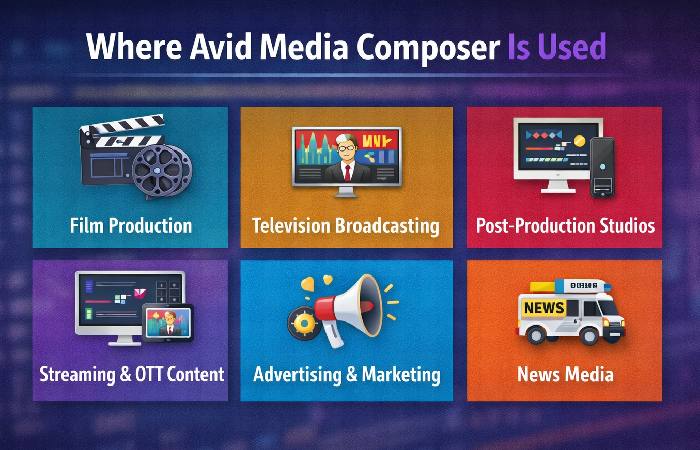
| Industry / Sector | How It Is Used | Examples |
| Film Production | Editing feature films, trailers, and cinematic content | Hollywood and international film studios |
| Television Broadcasting | Editing TV shows, news programs, and documentaries | Major broadcast networks and production houses |
| Post-Production Studios | Professional video editing, color correction, and finishing | Film editing and visual post-production companies |
| Streaming & OTT Content | Editing web series and digital platform content | Streaming platforms producing original shows |
| Advertising & Marketing | Editing commercial advertisements and promotional videos | Advertising agencies and media production studios |
| News Media | Fast editing of news footage and live broadcast segments | TV news channels and broadcast studios |
| Education & Film Schools | Teaching professional film editing techniques | Film and media institutes |
Why It Is Widely Used
- Industry-standard editing platform for film and TV
- Handles large media projects and high-resolution formats
- Supports collaborative editing workflows
- Reliable for long-form and professional productions
Tips for making the transition (from Premiere / Resolve / Final Cut)
- Practice trim modes: Spend time with three-way trim and slip/slide — these are where Media Composer shines.
- Understand media paths: Learn how Avid links media (consolidate, transcode, AMA linking) so projects move cleanly between machines.
- Use project sharing early: If you work with a team, get comfortable with project locking and the check-in/check-out flow.
- Learn bin discipline: If you’re used to a simple file/folder model, adopt bins as your primary organizational tool.
Quick troubleshooting & maintenance checklist
- Regularly back up bins and project folders.
- Keep media paths consistent when moving between drives.
- If playback stutters, check transcode settings and try working with DNxHR/DNxHD proxies.
- Use project export and consolidate media for handoffs to color or audio teams.
Final Verdict
If your work demands repeatability, collaboration, and ironclad media management, Avid Media Composer remains one of the most dependable choices in professional post-production. It’s not the easiest tool to learn — but for the right projects, its discipline pays back in fewer surprises during finishing and delivery. Recent updates show Avid modernizing the product with smarter transcript workflows and proxy/high-res link features, narrowing gaps with modern conveniences while keeping the enterprise features intact.
Khizrana Begum is a Web & Informational Content Writer who creates clear, practical and reader-friendly content across web topics, technology, digital trends, online guides and general information.
Sameena Begum is a Web & Digital Content Reviewer who reviews selected WorldWideWebBlog articles for clarity, structure, consistency, readability and responsible presentation.