
 Khizrana Begum
Web & Informational Content Writer
Khizrana Begum is a Web & Informational Content Writer who creates clear, practical and reader-friendly content across web topics, technology, digital trends, online guides and general information.
Read Full Bio of Author →
Web & Informational
Khizrana Begum
Web & Informational Content Writer
Khizrana Begum is a Web & Informational Content Writer who creates clear, practical and reader-friendly content across web topics, technology, digital trends, online guides and general information.
Read Full Bio of Author →
Web & InformationalContent Writer
 Sameena Begum
Web & Digital Content Reviewer
Sameena Begum is a Web & Digital Content Reviewer who reviews selected WorldWideWebBlog articles for clarity, structure, consistency, readability and responsible presentation.
Read Full Bio of Reviewer →
Web & Digital
Sameena Begum
Web & Digital Content Reviewer
Sameena Begum is a Web & Digital Content Reviewer who reviews selected WorldWideWebBlog articles for clarity, structure, consistency, readability and responsible presentation.
Read Full Bio of Reviewer →
Web & DigitalContent Reviewer
Understanding Cyber Attack Vectors Targeting IT Infrastructures – Imagine your school’s computer system getting hacked, stopping you from accessing your assignments or grades. Cyberattacks are a big problem for businesses, schools, and even governments. Every new device, app, or website creates new ways for hackers to sneak in. Learning about attack vectors—the ways hackers break into systems—helps us protect our information and stay safe online.
Table of Contents
What Are Cyber Attack Vectors?
An attack vector is like a door or window that a hacker uses to get into a computer system. It’s different from the attack surface, which is all the possible entry points a hacker could use to break in. Attack vectors can be technical, such as finding a bug in a program, or human-based, such as tricking someone into sharing their password. Knowing these “doors” helps schools and companies lock them before hackers can cause trouble.
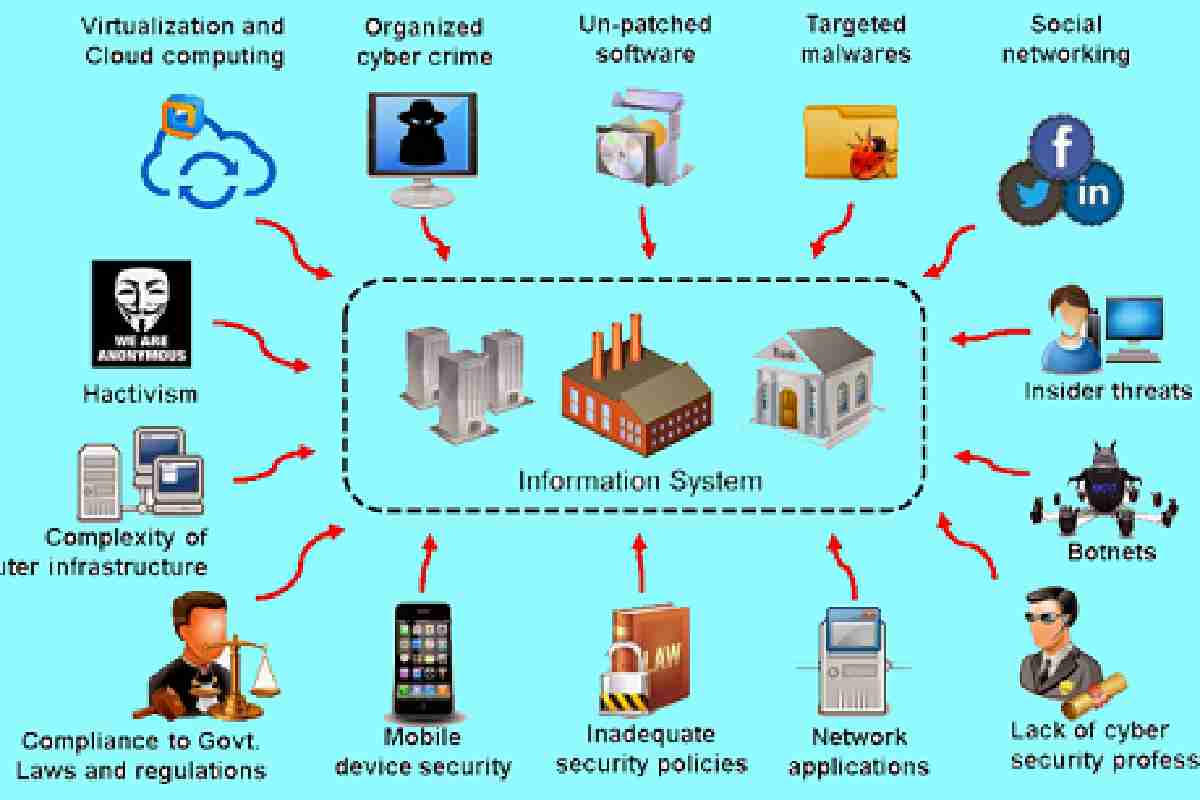
An attack vector is the path or method an attacker uses to gain unauthorized access to a system. Think of it as the doorway through which criminals attempt to break in. It differs from an attack surface, which refers to the total number of possible entry points that can be exploited. Attack vectors can be technical, such as exploiting a software flaw, or human-focused, such as tricking employees into revealing login credentials. Because they serve as gateways, attackers rely on them to move deeper into networks and access sensitive information. Knowing these entry methods is essential for both preventing breaches and understanding cyberattacks and their causes quickly when they occur. That is why organizations are investing in awareness and robust controls. This makes it an effective target to launch cyberattacks against corporate networks.
Common Ways Hackers Attack IT Systems
Phishing and Tricking People. Phishing is when hackers send fake emails, texts, or messages that look real to trick you into clicking on malicious links or sharing your password. For example, you might get an email pretending to be from your teacher asking you to log in to a fake school website.
Malware and Ransomware. Malware is harmful software that messes up computers or steals information. Ransomware is a type of malware that locks your files and demands money to unlock them. Imagine if a hacker locked all your school’s computers until the school paid them!
Software Weak Spots Hackers love finding bugs or glitches in apps or systems that haven’t been updated. These are called vulnerabilities. If your school’s software isn’t up to date, a hacker could exploit a glitch to sneak in.
Weak or Stolen Passwords Using simple passwords like “123456” or reusing the same password everywhere makes it easy for hackers to guess or steal them. If a hacker gets a teacher’s password, they could access the whole grading system.
Cloud and App Mistakes: Many schools use cloud services (such as Google Drive) to store files. If these aren’t set up properly, hackers can find and steal data. It’s like leaving your backpack open in the hallway—someone could grab your stuff.
DDoS Attacks A Distributed Denial-of-Service (DDoS) attack floods a system with so much traffic that it crashes. Imagine thousands of people trying to log into your school’s website at once, making it unusable.
Why Attacks Hurt Businesses and Schools
When hackers get in, they can cause big problems. Schools might lose important files, businesses might lose money, and people might stop trusting them. If a hacker steals student data, the school could face fines or lawsuits, and it might take years to rebuild trust.
How to Protect Against Attacks
Here’s how to keep hackers out:
- Check Everyone: Use a “Zero Trust” approach, meaning no one gets access until they prove their identity.
- Strong Passwords: Use long, unique passwords and enable multi-factor authentication (such as a code sent to your phone).
- Update Software: Keep apps and systems up to date to fix bugs.
- Train People: Teach students and teachers to spot phishing emails.
- Use Security Tools: Antivirus software can catch malware early.
Attacks in Different Industries
- Schools: Hackers might use phishing to steal student records.
- Hospitals: Ransomware can lock medical systems, delaying care.
- Stores: Malware on payment machines can steal credit card info.
- Factories: Hackers target smart machines to mess up production.
Using Threat Intelligence
Threat intelligence is like a weather forecast for cyberattacks. It uses data to warn about hacker tricks, helping schools and companies stop attacks early. Special tools and even AI can spot suspicious activity, like a hacker trying to log in at 3 a.m.
Challenges in Staying Safe
Protecting systems is hard because:
- Security tools generate a lot of alerts, and some are false alarms.
- There aren’t enough cybersecurity experts to watch everything.
- Schools need systems that are safe yet easy for students and teachers to use.
Best Ways to Stay Protected
- Test Systems: Pretend to be a hacker to find weak spots.
- Use Layers: Combine passwords, firewalls, and antivirus software for extra protection.
- Get Help: Work with experts if your school doesn’t have a big tech team.
- Keep Learning: Treat cybersecurity like a school subject—always keep improving.
The Future of Cybersecurity
In the future, AI will help detect attacks faster, and new encryption methods will keep data safer. Schools and companies will use tools to map out all their “doors” to better lock them. Countries will also work together to catch hackers, like a global cyber police force. Trusted sources like NIST provide frameworks to help build and maintain these practices.
Conclusion:
Building Strong Defenses Learning about attack vectors is like knowing how a thief might break into your house—you can lock the doors and windows before they try. By using technology, training people, and planning ahead, schools and businesses can stay safe. Cybersecurity isn’t just about stopping hackers today; it’s about being ready for tomorrow’s challenges.
FAQs
1. What’s the difference between an attack vector and an attack surface?
An attack vector is the specific way a hacker gains access, such as through a phishing email. The attack surface is all the possible ways they could try to access, such as every app or device in a school.
2. Which attack vector is the worst?
Ransomware is very harmful because it locks systems and demands money. Phishing is also problematic because it’s the most common way hackers start attacks.
3. How can schools recover after an attack?
Have backups of important files, a plan to fix the problem quickly, and clear communication with students and parents to keep things running smoothly.
Khizrana Begum is a Web & Informational Content Writer who creates clear, practical and reader-friendly content across web topics, technology, digital trends, online guides and general information.
Sameena Begum is a Web & Digital Content Reviewer who reviews selected WorldWideWebBlog articles for clarity, structure, consistency, readability and responsible presentation.